Reducing screen time does not mean rejecting technology. Phones and computers help us work, learn, stay in touch, and relax. The problem begins when useful screen time quietly turns into automatic checking, endless scrolling, or late-night viewing that leaves us tired and distracted.
The best approach is not a dramatic digital detox. It is a set of small changes that make your devices easier to put down. These ten practical ideas can help you reduce screen time without making daily life harder.
Why Reducing Screen Time Can Help
Screen use often overlaps with long periods of sitting. The World Health Organization recommends limiting sedentary time and replacing some of it with physical activity of any intensity. Sleep matters too. A large study of more than 122,000 adults found that daily screen use before bed was associated with later bedtimes and poorer self-reported sleep quality. These findings show association rather than proof that every screen causes a problem, but they give us a good reason to protect movement, rest, and attention.
1. Check Where Your Time Actually Goes
Start with your phone’s weekly screen-time report. Look for the two apps you use most outside work. Do not judge yourself. Ask a simpler question: did this time give me what I wanted?
Separate necessary use from optional use. Two hours of navigation, work calls, or study is different from two hours of scrolling you barely remember. This distinction gives you a realistic target.
2. Reduce One Habit, Not Everything at Once
Choose one change for the next week. You might reduce social media by 20 minutes a day, stop checking news after dinner, or keep the first 15 minutes of your morning screen-free. A small rule you can repeat is more useful than an extreme plan you abandon after two days.
3. Turn Off Notifications That Do Not Need You
Every sound, badge, and vibration asks your brain to switch direction. Keep alerts for people and services that may genuinely need a quick response. Turn off promotions, likes, game updates, and routine news alerts. You can still open those apps when you choose.
4. Give Your Phone a Home
Place your phone in one visible spot instead of carrying it from room to room. During meals, focused work, or conversation, leave it there. A little physical distance interrupts the reflex to check it.
If you use your phone as an alarm, charge it across the room or try a simple alarm clock. Keeping the device away from the bed also removes one easy route into late-night scrolling.
5. Create Two Screen-Free Anchors
Choose moments that happen every day, such as breakfast and the last 30 minutes before sleep. Keep those moments screen-free. Anchoring the rule to an existing routine is easier than relying on willpower throughout the day.
6. Replace Scrolling With Something Specific
Removing a habit leaves an empty space. Decide in advance what will fill it. Keep a book near the sofa, take a short walk after lunch, stretch for five minutes, call a friend, prepare tea, or write tomorrow’s priorities on paper.
For a quiet alternative, try this beginner morning meditation guide or use a few minutes of natural breath awareness.
7. Make Distracting Apps Less Convenient
Move tempting apps off the home screen, sign out after use, or access them through a browser instead. Use built-in app limits or focus mode during work and study. These small barriers give you a moment to decide whether you really want to continue.
8. Use Screens With a Clear Purpose
Before unlocking your phone, name the reason: reply to a message, check the weather, pay a bill. Complete that task and close the device. If you catch yourself wandering into another app, pause and return to your original purpose.
9. Protect Your Sleep Routine
Bedtime screen use can delay sleep simply because interesting content keeps us awake. Light and emotional stimulation may also make it harder to settle. Try ending optional screen use 30 to 60 minutes before bed. Dim the room, prepare for the next day, read, or practise a quiet relaxation routine.
If you want a structured next step, the site’s free meditation retreat can help you build a steadier pause into the day.
10. Review the Result After One Week
Check your report again after seven days. Look beyond the total number. Are you sleeping earlier? Moving more? Finishing work with fewer interruptions? Spending more present time with other people? Keep the change that helped and adjust the one that felt unrealistic.
A Simple 7-Day Screen-Time Reset
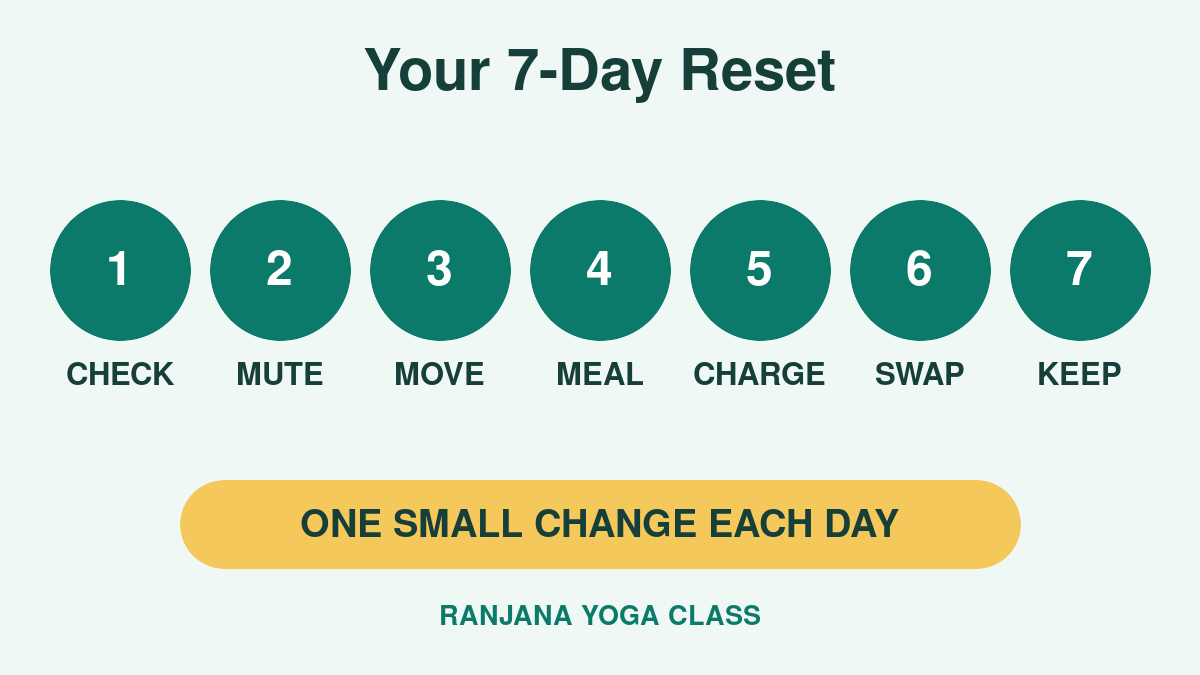
- Day 1: review your screen-time report.
- Day 2: turn off five unnecessary notifications.
- Day 3: move your most distracting app off the home screen.
- Day 4: take one phone-free meal.
- Day 5: charge your phone away from the bed.
- Day 6: replace 20 minutes of scrolling with walking, stretching, reading, or meditation.
- Day 7: review what worked and choose one habit to continue.
Frequently Asked Questions
How much screen time is too much for an adult?
There is no single useful limit for every adult because work, study, accessibility, and family needs differ. Focus on whether optional use is displacing sleep, movement, focused work, or relationships.
Should I stop using screens completely?
No. The goal is intentional use, not avoidance. Reduce the sessions that feel automatic or leave you worse off while keeping the technology that genuinely helps.
What is the easiest first step?
Turn off non-essential notifications and keep your phone out of reach during one daily activity. Both changes reduce checking without requiring a complicated plan.
Start Small and Stay Consistent
A healthier relationship with technology is built through repeated choices. Begin with one boundary that protects something you value: sleep, calm, movement, family time, or focused work. When that boundary feels natural, add another.
Sources: WHO Guidelines on Physical Activity and Sedentary Behaviour; Electronic Screen Use and Sleep Duration and Timing in Adults.